
A common and genuinely costly mistake is spending ₹40,000+ on a professional pen display before even knowing if digital art is something you’ll stick with. A ₹3,000-6,000 entry-level pen tablet teaches the exact same foundational skills — pressure control, line confidence, layer management — as a premium model, and you can always upgrade once your needs genuinely outgrow the hardware.
We compared three genuinely different tablets across the price range based on real driver stability and pen feel, not just pressure-level numbers on the spec sheet — because as any working artist will tell you, a tablet with unreliable drivers is frustrating regardless of how impressive its specs look on paper.
Quick Comparison
| Rank | Model | Type | Pressure Levels | Best For | Approx Price |
|---|---|---|---|---|---|
| 1 | Wacom Intuos Small/Medium | Screenless pen tablet | 4096 | Best driver reliability, industry standard | ₹6,000–9,000 |
| 2 | XPPen Deco 01 V3 | Screenless pen tablet | 8192 | Best value, large drawing area | ₹4,000–5,500 |
| 3 | XPPen StarG640 | Screenless pen tablet | 8192 | Best budget entry point | ₹2,000–2,800 |


1. Wacom Intuos (Small/Medium) — Best Driver Reliability, Industry Standard
Wacom has been the professional standard in this category for decades, and the real reason working artists pay a premium for it isn’t flashy specs — it’s driver stability. Pen lag and driver crashes are a genuine, common frustration with cheaper tablets, and Wacom’s refinement in exactly this area is a big part of what you’re paying for, alongside a textured, paper-like drawing surface that many artists find more natural than smoother alternatives.
Real trade-off worth knowing: at 4096 pressure levels, the raw spec number is lower than the 8192 levels on the XPPen options below — in practice, the difference is barely perceptible to most users, and Wacom’s driver stability advantage matters far more day-to-day than the pressure-level number itself.
- ✅ Most reliable drivers in the category — genuinely fewer crashes and pen-lag issues
- ✅ Textured surface with natural, paper-like pen resistance
- ✅ Industry-standard compatibility across all major creative software
- ⚠️ Priced above comparable XPPen alternatives with similar core functionality
- ⚠️ Smaller active drawing area than XPPen’s Deco 01 V3 at this price tier
Best for: Students and hobbyists who want the most reliable, frustration-free experience and are willing to pay a bit more for it.
- Brand: Wacom
- Connectivity Technology : USB
- Pressure Sensitivity: 4096 Levels
2. XPPen Deco 01 V3 — Best Value, Large Drawing Area
This genuinely delivers most of the core experience of a pricier tablet — a large active drawing area, a battery-free pen with 8192 pressure levels and tilt sensitivity, and modern USB-C connectivity, all at meaningfully less than Wacom’s equivalent. XPPen has been making drawing tablets since 2005 and operates in over 163 countries, so this isn’t an unproven brand despite the lower price.
Real trade-off worth knowing: driver stability, while genuinely improved over XPPen’s older models, still doesn’t quite match Wacom’s refinement — most users won’t notice a meaningful difference in daily use, but it’s worth knowing before buying if driver reliability is your top priority.
- ✅ Large active drawing area for the price
- ✅ 8192 pressure levels with tilt sensitivity, battery-free pen
- ✅ Modern USB-C connectivity
- ⚠️ Driver stability a small step behind Wacom’s industry-leading reliability
- ⚠️ Surface texture less refined than Wacom’s paper-like feel
Best for: Students and intermediate artists who want strong value and a larger working area without paying Wacom’s premium.
- ✅ [Large Active Area]: The XPPen Deco 01 V3 features a generous 10 × 6.25-inch (254 × 158.8 mm) active drawing surface, …
- ✅ [16,384 Pressure Sensitivity Levels]: With 16K pressure sensitivity, the stylus captures fine variations in line width…
- ✅ [Complete Bundle]: Each package includes the Deco 01 V3 tablet, P05D battery-free stylus, stylus stand, 10 replacement…
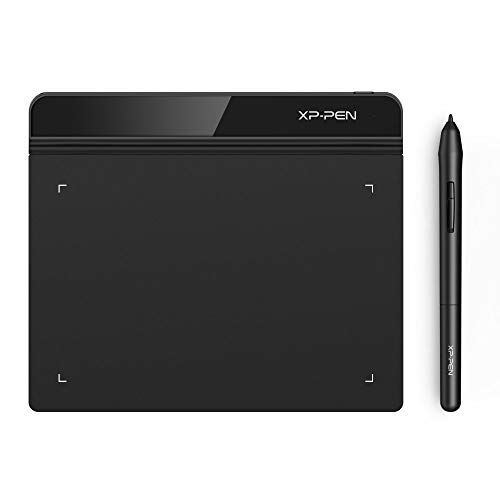
3. XPPen StarG640 — Best Budget Entry Point
This is genuinely the right starting point for anyone testing whether digital art is for them — a real 8192-pressure-level, battery-free pen at a price where the purchase is low-risk, letting you learn the actual foundational skills (pressure control, line work, basic layer management) before investing more.
Real trade-off worth knowing: the drawing area is noticeably smaller than the Deco 01 V3 above, which is fine for learning fundamentals but can feel cramped once you’re doing more detailed, larger-scale work — a natural upgrade point once your skills and needs grow.
- ✅ Lowest price in this comparison, genuinely low-risk way to start
- ✅ Real 8192 pressure levels despite the entry-level price
- ✅ Battery-free pen, no charging to manage
- ⚠️ Smaller drawing area, can feel limiting for detailed or large-scale work
- ⚠️ Basic build quality compared to pricier options
Best for: First-time digital artists and students testing the waters before committing to a bigger investment.
- ✅ [Compact, Portable size]: XPPen StarG640 is a compact graphic tablet with active area of 6×4 inches and thickness of j…
- ✅ [8192 levels of Pressure sensitivity]: Best-in-class 8192 levels of pen pressure sensitivity allows you to create vari…
- ✅ [Battery-free stylus]: Advanced P01 battery-free stylus does not require charging, allowing uninterrupted usage while …
Buying Guide: What Actually Matters
- Screenless vs pen display — the biggest decision, not brand: Screenless pen tablets (all three picks above) require looking at your monitor while drawing on the tablet surface — affordable, lightweight, and genuinely good for learning hand-eye coordination. Pen displays with a built-in screen feel more natural since you draw directly on it, but cost significantly more (often ₹40,000+) and are better suited once you’ve confirmed digital art is a long-term interest.
- Don’t overspend before you know your workflow: A common, costly mistake is buying a premium pen display while still learning fundamentals. A ₹3,000-6,000 pen tablet teaches identical foundational skills to a ₹40,000 pen display.
- Driver stability matters more than pressure-level numbers: 4096 vs 8192 pressure levels makes little perceptible difference to most users in practice. Reliable, crash-free drivers matter far more for a frustration-free daily experience.
- Always uninstall old drivers before switching brands: Conflicting drivers (e.g., leftover Wacom drivers when installing XPPen, or vice versa) are the single most common cause of setup problems and erratic pen behaviour — a simple, often-missed step.
- Software compatibility: All the tablets in this comparison work with Adobe Photoshop, Clip Studio Paint, and Krita — verify specific compatibility only if you’re using more specialized or older software.
For general electronics warranty and consumer rights information, see the Department of Consumer Affairs, Government of India.
Frequently Asked Questions
Should I buy a screenless tablet or a pen display for my first drawing tablet? A screenless pen tablet is the better starting point for most beginners — it’s significantly cheaper and teaches the same foundational skills. Pen displays feel more natural but cost considerably more, and are worth the investment once you’ve confirmed digital art is something you’ll stick with long-term.
Does a higher pressure-level number (8192 vs 4096) actually matter? In practice, the difference is barely perceptible to most users. Driver stability and overall build quality matter far more for a smooth daily drawing experience than the raw pressure-level spec.
Why is my new drawing tablet’s pen lagging or behaving erratically? The most common cause is a conflicting driver from a previously installed tablet brand — always fully uninstall old drivers (e.g., Wacom) before installing a new brand’s driver (e.g., XPPen) to avoid this issue.
Is XPPen a reliable brand compared to Wacom? Yes — XPPen has been manufacturing drawing tablets since 2005 and operates in over 163 countries. It offers strong value at a lower price than Wacom, though Wacom generally maintains a slight edge in driver stability and refinement.
Related reading: Best Monitor Arm for Desk in India (2026) · Best USB Docking Stations in India (2026)
Affiliate Disclosure: This post contains Amazon affiliate links. If you purchase through them, we may earn a small commission at no extra cost to you. All recommendations are based on independent research and genuine buyer feedback.