
A fixed monitor stand puts your screen at one height, one angle, permanently — fine until you notice yourself hunching forward by afternoon or squinting at glare from a window you can’t easily adjust away from. A proper monitor arm fixes this with real height, tilt, swivel, and depth adjustment, genuinely reducing neck and eye strain over a full workday rather than just looking tidier on the desk.
We compared three genuinely different options based on real weight capacity and adjustment range, not just the “fully articulating” claim every listing makes — a reliable single-monitor gas-spring arm, a versatile dual-monitor setup, and a genuine budget option that still delivers real articulation.
Quick Comparison
| Rank | Model | Setup Type | Screen Support | Best For | Approx Price |
|---|---|---|---|---|---|
| 1 | North Bayou NB F80 | Single | 17–30 inch | Best overall, smooth gas-spring adjustment | ₹1,800–2,500 |
| 2 | Tukzer Dual LCD Monitor Desk Mount | Dual | Up to 30 inch per arm | Best for side-by-side dual-screen setups | ₹2,500–3,200 |
| 3 | Amazon Basics Height Adjustable Steel Monitor Stand | Single | 13–27 inch | Best budget, double-jointed articulation | ₹1,200–1,600 |

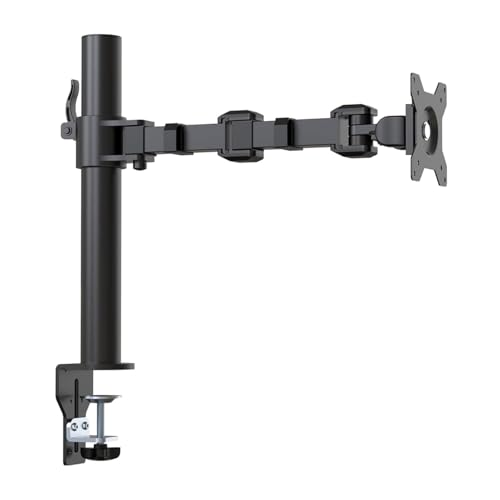
1. North Bayou NB F80 — Best Overall, Smooth Gas-Spring Adjustment
North Bayou is one of the most established names specifically in monitor arms, and the gas-spring mechanism here is the real differentiator — smooth, effortless height adjustment with just one hand, rather than the stiffer manual tension knobs found on cheaper mechanical arms. This genuinely makes adjusting your screen through the day (standing up, sitting back down, sharing your screen with someone) frictionless rather than a small daily annoyance.
Real trade-off worth knowing: gas-spring arms are calibrated to a specific weight range at the factory — if your monitor is notably lighter or heavier than the arm’s rated range, the spring tension can feel off, drifting up or down on its own, so checking your exact monitor weight against the arm’s rated capacity before buying matters more than with simpler mechanical designs.
- ✅ Smooth, effortless one-hand height adjustment via gas spring
- ✅ Wide 17-30 inch screen compatibility
- ✅ Both C-clamp and grommet mounting options included
- ⚠️ Gas spring tension calibrated to a weight range — check your exact monitor weight matches
- ⚠️ Pricier than basic mechanical double-joint arms
Best for: Anyone who adjusts their monitor position frequently through the day and wants smooth, low-effort articulation.
- ☑Universal: Fits computer monitor within 2 to 9KG, Which mean it can work for most of 17~30 inch monitors in the market,…
- ☑Full motion and more Adjustable: The monitor can be rotated and tilted effortlessly in any direction, Tilt Angel from -…
- ☑85% Sturdier than similar product: Heavy-duty construction and super quality materials Built in automotive-grade gas sp…
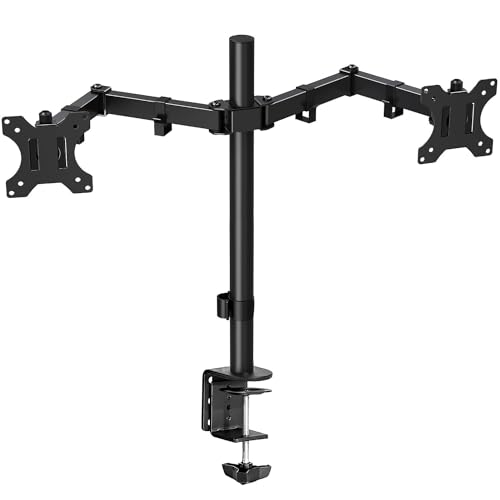
2. Tukzer Dual LCD Monitor Desk Mount — Best for Side-by-Side Dual Setups
Rather than two separate arm bases cluttering your desk, this uses one heavy-duty center post to hold two horizontal steel arms — a genuinely cleaner solution for dual-monitor work that clears real desk space compared to two independent mounts. An extra-wide tilt range (-15 to +85 degrees) plus individual 360-degree rotation per panel means each screen can be angled independently for your exact setup.
Real trade-off worth knowing: the single-base design that saves desk space also means both monitors share one mounting point — if you need to move the whole setup or your desk has an unusual thickness, you’re working with one attachment point for two screens rather than independent flexibility.
- ✅ Single mounting base clears significant desk space vs two separate arms
- ✅ Thick, heavy steel construction genuinely prevents sagging on either side
- ✅ Extra-wide tilt range and independent 360° rotation per screen
- ⚠️ Both monitors depend on one shared mounting point
- ⚠️ Requires more desk clamp space than a single-monitor arm
Best for: Dual-monitor setups where desk space is at a premium and you want screens aligned edge-to-edge without clutter.
- Dual Monitor Stand : This dual monitor mount for 2 monitors is a great addition to enhance your productivity and comfort…
- Fully Adjustable: Both monitor arm mounts ±90° tilt functions to adjust the monitor’s screen. It conveniently sets your …
- Easy to Install : Go with the installation manual, this dual monitor arm is easy to install. The heavy-duty C-clamp secu…
3. Amazon Basics Height Adjustable Steel Monitor Stand — Best Budget, Real Articulation
This genuinely doesn’t cut the one corner that matters most at budget prices — real double-jointed folding arm articulation, letting you pull the screen closer or push it away, not just a fixed-height post pretending to be an “arm.” Supporting up to 9kg across 13-27 inch screens with a detachable VESA plate, it covers the vast majority of home office monitor setups at a genuinely low price.
Real trade-off worth knowing: at this price, expect a simpler mechanical tension system rather than gas-spring smoothness — height adjustment works reliably but requires a bit more manual effort than the pricier gas-spring options above.
- ✅ Genuine double-jointed articulation at a budget price
- ✅ Supports up to 9kg, covers 13-27 inch screens
- ✅ Both C-clamp and grommet installation supported
- ⚠️ Manual tension adjustment, not gas-spring smooth
- ⚠️ Screen size range tops out at 27 inches, unsuited to larger monitors
Best for: Students and remote workers wanting genuine flexibility and desk space savings without a premium price tag.
- Maximum Compatible Size : 30 Inches
Buying Guide: What Actually Matters
- Check your monitor’s actual weight, not just screen size: A 24-inch monitor with its stand removed typically weighs 2.8-3.6kg. Most ₹2,000-range arms in India support 2-9kg, which covers this comfortably. Once you cross 27 inches or 6kg (large 4K or curved panels), you need a heavier-duty arm in the ₹4,500-7,000 range instead.
- VESA compatibility is essential: Nearly all monitor arms use a 75x75mm or 100x100mm VESA mounting pattern on the back of your screen. Check your monitor supports this (most modern monitors do) before buying — a small number of budget or older monitors don’t have VESA mounting holes at all.
- C-clamp vs grommet mounting: C-clamp mounting works for most standard desks (0.4-2.8 inch thickness) without drilling. Grommet mounting needs an existing cable-management hole in your desk but can offer a slightly more secure, permanent-feeling setup.
- Gas-spring vs mechanical tension: Gas-spring arms adjust smoothly with one hand but are calibrated to a specific weight range — verify your monitor’s weight falls within the rated range. Mechanical tension arms are more affordable and adjustable, but need slightly more manual effort each time.
- Single vs dual arm setup: If you’re planning to add a second monitor later, a dual-arm setup from the start avoids buying and reinstalling separate hardware later — worth considering even if you’re currently running one screen.
For general workplace ergonomics guidance, see the National Institute of Occupational Health, Indian Council of Medical Research.
Frequently Asked Questions
Do I need a monitor arm if I already have a stand? A fixed stand works fine if you have one screen at a comfortable, unchanging height. A monitor arm is worth it if you frequently adjust position, share your screen with others, use a standing desk, or want to reclaim desk space underneath your monitor.
How do I know if my monitor is compatible with a monitor arm? Check for VESA mounting holes (usually 75x75mm or 100x100mm) on the back of your monitor — most modern monitors support this. Also confirm your monitor’s weight falls within the arm’s rated capacity.
Is gas-spring or mechanical tension better for a monitor arm? Gas-spring arms offer smoother, one-hand adjustment but need your monitor’s weight to match the arm’s calibrated range. Mechanical tension arms are more budget-friendly and still fully adjustable, just requiring slightly more manual effort.
Can a monitor arm hold two screens? Yes — dual monitor arms use either two independent arms on separate bases, or a single center post with two horizontal arms, letting you position both screens side-by-side while saving desk space compared to two separate stands.
Related reading: Best Ergonomic Office Chairs in India (2026) · Best USB Docking Stations in India (2026)
Affiliate Disclosure: This post contains Amazon affiliate links. If you purchase through them, we may earn a small commission at no extra cost to you. All recommendations are based on independent research and genuine buyer feedback.