
Are you searching for the top best 4K monitors for coding and productivity in India that offer pin-sharp text clarity, accurate colors, and a single-cable USB-C setup? In 2026, staring at a grainy 1080p display for 10 hours a day is no longer just a compromise; it is a direct threat to your eye health and daily output.
As I manage global cloud deployments and scale infrastructure at Pearl Cloud Solutions, my workspace is my cockpit. When you are debugging deep into the night, jumping between multiple SSH terminals, and reviewing complex React components, screen real estate is everything. A high-resolution 4K monitor provides the pixel density required to see more lines of code simultaneously without excessive scrolling. Furthermore, a clean, minimalist desk setup with a high-end IPS panel—featuring ultra-thin bezels and a professional slate-grey finish—instantly creates an enterprise-level environment that fosters deep focus.
We have scanned Amazon India’s live 2026 inventory to find the highest-rated, in-stock professional displays. From LG’s USB-C mastery to Dell’s legendary UltraSharp reliability, these are the top 5 best 4K monitors for coding in India that will transform your professional workflow!
🔥 Complete Your Setup: A high-end monitor is only one part of the puzzle. Ensure your hands stay comfortable during long coding sessions by checking out our guide on the Best Mechanical Keyboards Under ₹2,500 in India (2026).
Table of Contents
- The All-Rounder: LG 27-Inch 4K UHD (27UP850N)
- The Productivity King: Dell UltraSharp U2723QE
- Developer’s Favorite: BenQ PD2706U DesignVue
- Premium Matte Finish: Samsung ViewFinity S8
- Budget 4K Powerhouse: Acer Nitro V272
- Comparison Table: Top 5 4K Productivity Monitors
- Smart Buying Guide (PPI, USB-C PD & Eye Care)
Top 5 Best-Selling 4K Productivity Monitors (2026)
1. LG 27-Inch 4K UHD VESA DisplayHDR 400 (27UP850N)
Best For: MacBook Users, Minimalist Desks & Single-Cable Connectivity. If you use a modern laptop and want to eliminate cable clutter, the LG 27UP850N is the undisputed gold standard for professional workspaces.
- Why it is a Top Pick: This monitor features a high-performance USB-C port with 90W Power Delivery. This means a single cable transmits the 4K video signal, data, and charges your laptop simultaneously! The IPS panel with 99% sRGB color gamut ensures that your UI designs and code look exactly as intended. The hardware calibration support makes it a favorite for developers who also dabble in color-accurate work.
- Ergonomic Posture: Even with a great stand, you might need more height. Pair this with one of the Best Laptop Stands Under ₹1,000 in India (2026) to keep your secondary screen at eye level.
- Amazon Rating: ⭐ 4.5/5
- Buy Now: Check Price on Amazon

- Brilliant Display: 27″ Ultrawide (3840 x 2160) IPS Display | DCI-P3 95% Color Gamut with HDR 10 | 1.07 B Colors | Refres…
- Connectivity: With HDMI, USB Type-C, USB Down-stream, DisplayPort and Headphone Out. Multimedia enjoyment is now easier …
- Special Features: Color Weakness Mode, Adaptive Sync, Black Stabilizer, Dynamic Action Sync, Flicker Safe, Smart Energy …
2. Dell UltraSharp 27-Inch 4K USB-C Hub Monitor (U2723QE)
Best For: Full-Stack Developers, Extreme Contrast & Reliable Durability. Dell’s UltraSharp line has been the benchmark for office productivity for decades. The U2723QE is the first to introduce the revolutionary IPS Black technology.
- Why it is a Top Pick: Standard IPS monitors often struggle with “greyish” blacks. Dell’s IPS Black technology provides 2,000:1 contrast ratio—double that of standard monitors. This makes text appear incredibly sharp against dark IDE themes (like VS Code Dark+). It also acts as a full productivity hub with an Ethernet port, multiple USB-A ports, and KVM support to control two PCs with one mouse.
- Precision Control: A high-res screen needs a high-res mouse. Check out our guide on the Best Wireless Mouse Under ₹500 in India (2026).
- Amazon Rating: ⭐ 4.6/5
- Buy Now: Check Price on Amazon
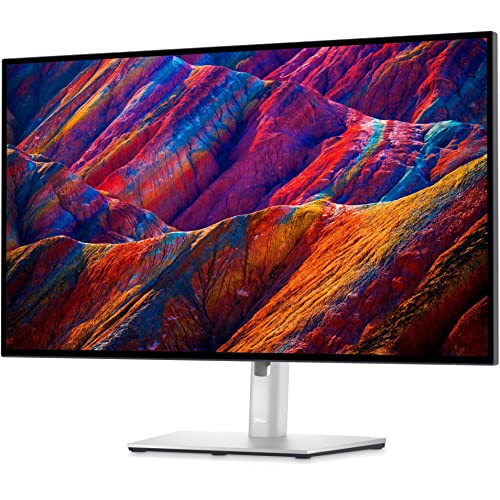
- Native Resolution: 4K 3840 x 2160 at 60 Hz Panel Technology: IPS Black Technology
- Built-in Devices: USB 3.2 Gen 2/USB-C hub
- Panel Type: IPS Black Technology
3. BenQ PD2706U 27-Inch 4K Designer Monitor
Best For: UI/UX Designers, Night Coding & Eye Care. BenQ is world-renowned for its focus on eye health. If you suffer from headaches or eye strain after a long day of reviewing pull requests, this is the monitor for you.
- Why it is a Top Pick: It comes with “Coding Mode,” which optimizes contrast and saturation to make text pop and reduce fatigue. It includes the “Hotkey Puck G2,” a physical dial on your desk that lets you switch between color modes (like Darkroom, sRGB, or M-Book) instantly. The 90W USB-C PD ensures your high-performance laptop stays juiced up during heavy compilations.
- Amazon Rating: ⭐ 4.4/5
- Buy Now: Check Price on Amazon
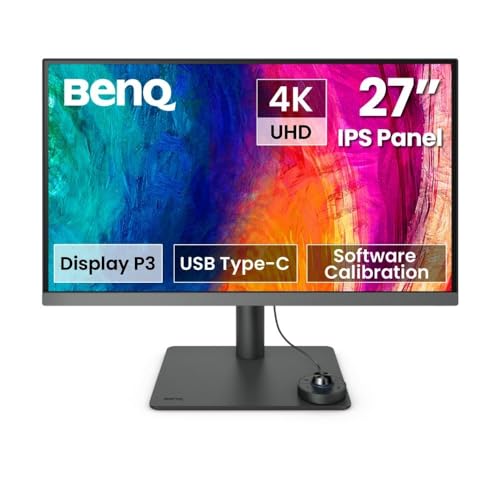
- Display: 27” 4K UHD IPS Monitor with 3840 x 2160 resolution, 350nits brightness, 5ms Response time, 60 Hz,
- Aspect Ratio: 16:9 | 178°/178° Viewing Angles for clarity from any viewpoint. Stand: VESA wall mount provision 100×100 (…
- VESA DisplayHDR 400 : Intelligent clarity adjustment and brightness control plus emulated HDR make every image stunning …
4. Samsung 27-Inch ViewFinity S8 4K (LS27B800PXWXXL)
Best For: Bright Rooms, Glare Protection & Modern Aesthetics. If your home office has a large window or bright overhead lights, screen reflections can be a nightmare for productivity.
- Why it is a Top Pick: The ViewFinity S8 features the world’s first UL-verified Glare-Free Matte Display. It virtually eliminates reflections, allowing you to see your code clearly even in direct sunlight. It covers 98% of the DCI-P3 color space, providing cinema-grade color accuracy. The minimalist metal stand is ultra-thin, freeing up massive space on your desk for notebooks and peripherals.
- Stay Cool: Working in a bright, sunny room? Ensure you stay comfortable by checking out the Best 1.5 Ton ACs Under ₹35,000 in India (2026).
- Amazon Rating: ⭐ 4.3/5
- Buy Now: Check Price on Amazon
5. Acer Nitro V272 27-Inch 4K UHD (Budget Choice)
Best For: Students, Freelancers & Occasional Gaming. Not everyone can spend ₹50,000 on a monitor. Acer offers a high-resolution 4K IPS experience at a price that is nearly half of its premium competitors.
- Why it is a Top Pick: While it lacks the high-wattage USB-C power delivery of the premium models, it provides a stunning 4K IPS panel with 100% sRGB coverage. It features a 60Hz refresh rate and a very fast 4ms response time. If you primarily use a desktop PC or don’t mind using two cables for your laptop, this is the absolute best value-for-money 4K display in India.
- Amazon Rating: ⭐ 4.2/5
- Buy Now: Check Price on Amazon

- 【Mini LED】27 Inch IPS Panel UHD (3840 x 2160) Resolution 1152 Zone Mini LED Gaming Monitor (dims the backlight behind pa…
- 【DFR Refresh】Monitor support 4K UHD @ 160Hz Good for Office work,Streaming, Graphic focussed gaming for High Speed Focus…
- 【Connectivity Options】 2 x HDMI (2.1) 1 x Display (1.4), 1 x Type-C 90W PD, USB 3.2×2+USB-B (1up 2down) Ports with Inbox…
6. Comparison Table: Top 5 4K Productivity Monitors
| Brand & Model | Port Selection | Key Developer Feature | Amazon Rating |
| LG 27UP850N | 90W USB-C PD | VESA HDR 400 + Calibration | ⭐ 4.5 |
| Dell U2723QE | 90W USB-C + RJ45 | IPS Black (2000:1 Contrast) | ⭐ 4.6 |
| BenQ PD2706U | 90W USB-C PD | Hotkey Puck + Coding Mode | ⭐ 4.4 |
| Samsung S8 | 90W USB-C PD | UL-Verified Matte (No Glare) | ⭐ 4.3 |
| Acer Nitro V272 | HDMI / DP | Best Value 4K IPS Panel | ⭐ 4.2 |
7. Smart Buying Guide: Maximize Your Productivity!
1. PPI (Pixels Per Inch) is the Secret to Sharp Text
When coding, you aren’t looking at moving images; you are looking at static, sharp lines of text. A 27-inch 4K monitor has a PPI of roughly 163. This is the “retina” sweet spot where the human eye cannot distinguish individual pixels. On a 1080p monitor of the same size, the PPI drops to 81, making text look “fuzzy” or “aliased,” which leads to significant eye strain after just 2 hours of work.
2. Why USB-C Power Delivery (PD) is Mandatory
If you use a laptop (MacBook, Dell XPS, or ThinkPad), do not buy a monitor without USB-C Power Delivery.
- Without PD: You have to plug in your HDMI cable AND your bulky laptop power brick every time you sit at your desk.
- With PD: A single USB-C cable (found in the LG, Dell, BenQ, and Samsung models) sends the 4K video to the screen and simultaneously charges your laptop with up to 90W of power. It turns your monitor into a docking station!
3. IPS Black vs. Standard IPS
Standard IPS panels are great for colors but usually have a contrast ratio of 1000:1. This makes “Dark Mode” in your IDE look slightly grey or washed out. IPS Black (featured in the Dell UltraSharp) doubles this to 2000:1. This results in much deeper blacks and significantly higher contrast, making your code stand out with clinical precision.
❓ Frequently Asked Questions (FAQ)
Q1: Can my laptop handle a 4K monitor at 60Hz?
Most laptops from 2022 onwards (including all Apple M1/M2/M3 chips) can handle 4K at 60Hz via their USB-C or HDMI 2.0 ports. However, very old budget laptops might be capped at 4K 30Hz, which makes the mouse cursor feel “laggy.” Always check if your laptop’s port supports HDMI 2.0 or DisplayPort 1.4.
Q2: Is 27 inches or 32 inches better for 4K coding?
- 27-Inch: Offers higher pixel density (sharper text). Perfect for standard desks where you sit 2-3 feet away.
- 32-Inch: Offers more physical space. Better if you want to keep three windows open side-by-side without scaling. However, text might look slightly less sharp than on a 27-inch model.
Q3: Do I need a high refresh rate (144Hz) for coding?
No. While 144Hz feels “buttery smooth” for gaming, it adds very little value to coding or spreadsheets. A stable 60Hz 4K monitor with superior color accuracy and eye-care features (like BenQ or Dell) is a much better investment for a professional developer than a budget 144Hz gaming monitor.
Conclusion: Which 4K Monitor Should You Buy?
- For the Cleanest MacBook Setup: Buy the LG 27UP850N 4K Monitor.
- For the Absolute Best Text Clarity & Contrast: Buy the Dell UltraSharp U2723QE.
- For Zero Reflections in Bright Rooms: Grab the Samsung ViewFinity S8 Matte.
Affiliate Disclosure: As an Amazon Associate, I earn from qualifying purchases using my tracking ID trendfinday-21. Prices and availability are subject to change based on real-time Amazon data.
Author: Amresh B
Last Updated: April 30, 2026